GoDaddy domain setup guide
Make your site memorable and easy to find with a branded custom domain.
It's possible to map a domain or subdomain you own directly your Ghost(Pro) publication by adding a CNAME record within your domain's DNS settings. Each Ghost(Pro) publication is also provided an SSL certificate by default, which is renewed for you automatically each year.
If you own a GoDaddy domain, the following steps explain how you can implement a custom domain with your Ghost(Pro) publication.
Step 1: Access your domain DNS settings
The first step in setting up your custom domain is to sign into your GoDaddy account and head over to your domain's DNS settings in the My Products area.
Select the domain you would like to configure with your Ghost(Pro) publication:
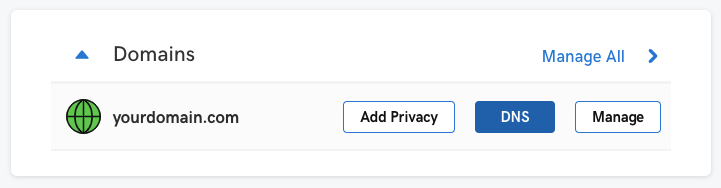
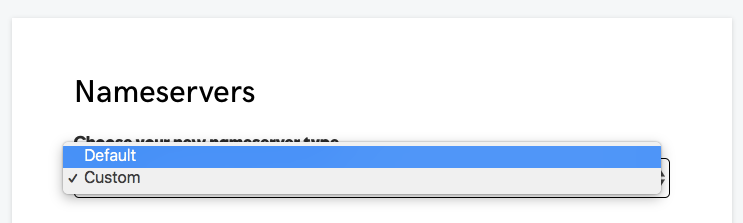
If you do not see DNS records from the DNS settings, ensure that GoDaddy manages your nameservers by selecting the default nameservers:
Step 2: Create DNS Records
To achieve a subdomain setup for your publication (e.g. www.yourdomain.com), create the following DNS records within GoDaddy's DNS settings:
| Subdomain DNS Configuration | ||
|---|---|---|
| Record Type | Host | Value |
CNAME |
www |
<subdomain>.ghost.io |
A |
@ |
178.128.137.126 |
Note: The A record will automatically redirect the http and https root domain to the subdomain you configure.
Root Domain Configuration
GoDaddy does not support CNAME root domain configurations and using an A record to achieve a root domain is not supported. To setup a root domain configuration, we recommend that you consider using Cloudflare for additional flexibility
Step 3: Activate the Custom Domain
The final step to complete your custom domain setup is to go back to Ghost.org and activate your custom domain.
-
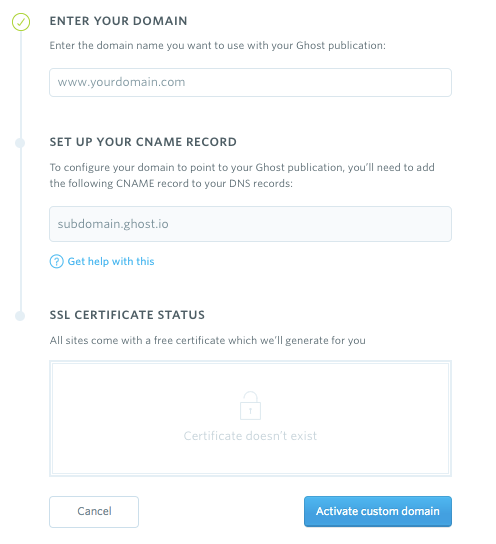
Log into your Ghost.org account at my.ghost.org/signin and setup a custom domain in the "Domain Settings" section.
-
Enter the domain into the custom domain field on my.ghost.org, e.g.
www.yourdomain.com:
-
Activate your custom domain - this can take anywhere from a few seconds to a few hours due to the length of time your DNS takes to propagate.
-
Once activated, you can view your publication by going to the custom domain directly from the browser.
Summary
You did it! 🎉 You've successfully configured your DNS on GoDaddy to point to your Ghost(Pro) site!