In this section we'll dive into more detail how to expose more extensive information about a member in a Ghost theme, such as their subscription, as well as providing options for a member to update their details.
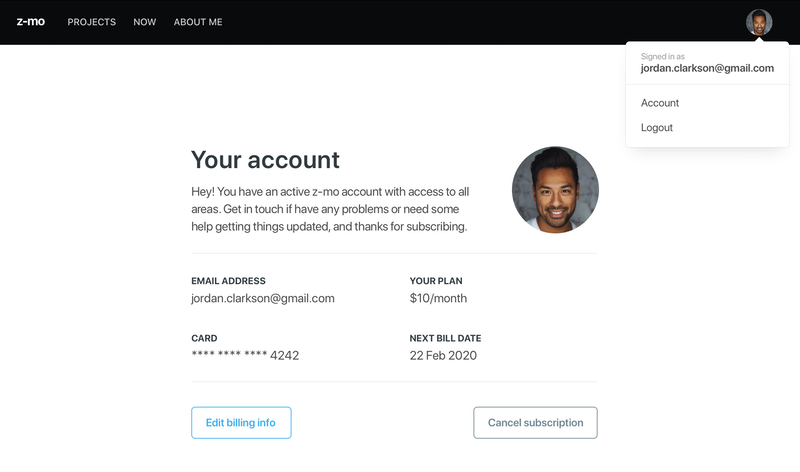
To get a cursory view of @member and how to use it in templates take a look at our Members Content visibility section.
The @member object
The @member helper comes with a series of attributes that expose all the information required to create a unique experience for all members of your Ghost site.
Member attributes
@member– The member object, returns true or false if the viewer is a member or not@member.paid– The member's payment status, returns true or false if the member has paid@member.email– The member's email address@member.name– The member's full name@member.firstname– The member's first name. String created from everything before the first whitespace in the member's full name@member.uuid– A unique identifier for a member for use with analytics tracking such as Google Tag Manager
Member subscriptions
As well as member information, it's also possible to get information about a member's subscription using data that comes from the Stripe integration.
@member.subscriptions is useful for showing your audience their payment status, plans and what they're paying.
Because of the possibility that a single member could have multiple subscriptions the data is provided as an array. Subscription data can be exposed using a #foreach like so:
<p>Name: <strong></strong></p>
<p>Plan type: <strong></strong></p>
<p>Status: <strong></strong></p>
Subscription attributes
Subscription data comes from Stripe meaning a valid Stripe account is required. Check out our documentation on connecting your Stripe account Using subscription data in a local environment will require the Stripe CLI tool, please refer to the official Stripe documentation for more info.
Member subscriptions comes with a verbose list of attributed data:
id– The Stripe ID of the subscriptionavatar_image— The customers avatar image, pulled in from Gravatar. If there is not one set for their email a transparentpngwill be returned as a defaultcustomer.id– The Stripe ID of the customercustomer.name– The name of the customer in Stripecustomer.email– The email of the customer in Stripeplan.id– The Stripe ID of the planplan.nickname– The Stripe nickname of the plan (currently only "Monthly" or "Yearly")plan.interval– The Stripe plan payment interval (currently only "month" or "year")plan.currency– The currency code of the plan as an ISO currency code, currently supports USD, CAD, AUD, GBP and EURplan.currency_symbol– The currency symbol of the plan (e.g.$,£,€)plan.amount– The amount of the Stripe plan in the smallest currency denomination (e.g. USD $5 would be "500" cents)status– The status of the subscription (can be "active" or "trialing")start_date– The date which the subscription was first starteddefault_payment_card_last4– The last 4 digits of the card that paid the subscriptioncurrent_period_end– The date which the subscription has been paid up until
Note that both start_date and current_period_end can be used in conjunction with the {{date}} helper
Member account editing
Members may want to update their billing information. Rather than contacting the site owner the member can be linked to a page to update their details with a single button:
<a href="javascript:" data-members-edit-billing>Edit billing info</a>Additional attributes can be used to direct the member do different URLs depending on if they update their billing information or cancel their subscription:
<a href="javascript:"
  data-members-edit-billing
  data-members-success="/billing-update-success/"
  data-members-cancel="/billing-update-cancel/"
>Edit billing info</a>
price helper
The {{price}} helper formats monetary values from their smallest denomination to a more human readable denomination. This is best used in the context of a subscription plan to format Stripe plan amounts (see plan.amount above). With the price helper 500 "cents" becomes 5 "dollars". Example:
This will output $5.
price can be used with static values as well, {{price 4200}} will output 42. A more contextual example can be found in Lyra theme on GitHub.