Custom Excerpts
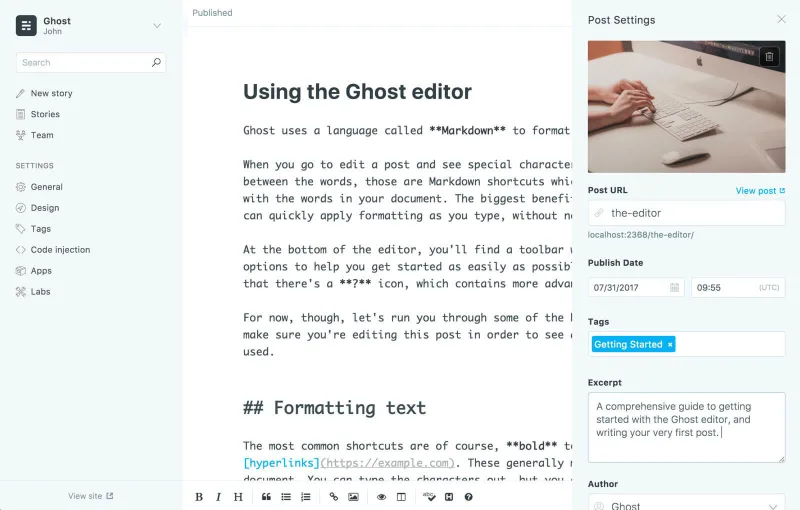
What's a custom excerpt? It's this! This piece of text, you're reading it right now! Click through for the full story on why these are useful 🕺🏻
Primary Tags
Any post in Ghost can have multiple tags, but Ghost also pays attention to the order of those tags. The first tag entered is considered the most important, and is treated as a special case.
For a while now, you've been able to drag and drop the order of tags in admin to set the correct primary tag, and also access a post's first tag using {{tags.[0]}}. This syntax is less than ideal, however, and it's hardly discoverable for theme developers, so we've introduced a new data object: {{primary_tag}} - to accomplish the same thing in a more friendly way.
Now if you're developing a theme and you just want to render the single most important categorisation label, you can directly access properties of the first tag with {{primary_tag.name}} to easily achieve this. If you want to do more, you can open a block with {{#primary_tag}}{{/primary_tag}} to get access to all the context-sensitive helpers like {{url}} & {{img_url}.
Example usage
If a post has tags of News, Design, Architecture - there are several ways to work with them:
Using the default {{tags}} helper will render a simple list of all post tags, linked to their respective archives: News, Design, Architecture
If you just wanted to output the primary tag and create a special link for that one case, then you could do what we do in Casper 2.0:
{{#primary_tag}}
    <a href="{{url}}">{{name}}</a>
{{/primary_tag}}
This way you can still have fairly liberal use of tags to determine posts which are related and belong together, but still keep a neat category-like taxonomy for output on the front end.
Hopefully this gives you a little more power and flexibility when building your next theme. If you're interested in finding out what else you can do, this and other theme API functionality is all documented over on http://themes.ghost.org/.
This change was released in Ghost 1.2.0. Self hosted developers can use Ghost-CLI to get this feature by running $ ghost update to install the latest release. Ghost(Pro) users will be upgraded automatically, soon.
Hemingway Mode

Following the release of Ghost 1.0 last week, we're trying to get back into the habit of doing smaller, simpler releases and getting them out into the wild. So today we're releasing a tiny feature called Hemingway Mode, because the shortest answer is doing the thing. There's an old quote which is famously misattributed to Ernest Hemingway, who supposedly once posited that one should: > “Write drunk; edit sober.” Regardless of whether or not he ever actually said it (we're sure you'll let us
Ghost 1.0.0 - React, redux and redis??
jk lol 🤓 here's what really happened...
Ghost 1.0.0 is now available on GitHub, npm and Ghost.org.
No seriously. It's done! In fact... there's a 1.0.2 😬!
Highlights
- [New] Editor, default theme, new user tour, nightshift mode, and many other admin improvements. More details in the announcement blog post here
- [New] Config with nconf, logging with bunyan, and debug output using debug.
- [Improved] Publish menu which brings scheduling front and centre, instead of it being an after thought
- [Improved] Simplified content screen with filtering makes it easier to find
- [Improved] The importer has had a complete overhaul, is now more robust and outputs much, much better error & warning messages when things do go awry
- [Changed] Internal tags is no longer in labs, and the Public API Beta is now enabled by default (we're getting there!)
- [Changed] Various aspects of the Theme API, see the theme changelog for more details...
- [Fixed] Addressed many issues with session handling, so you get logged out far less often or maybe even not at all
- And much, much, much more...
You can see the full change log for the details of all changes included in this release.
In Detail
Ok everyone, grab yourself a coffee and settle down - this is gonna be a big one! ☕️
Ghost 1.0.0 is a major rework and as a result there are a plethora of developer-facing changes that should make both our, and your life easier. Here's the ins and outs of what's changed...
Simplifying Installs & Upgrades
We always dreamed of a Ghost that was easy to install & upgrade. This was the original thought behind picking SQLite3 - no need to configure or setup databases. Unfortunately the binary dependency has always caused more problems than we ultimately solved.
Time for an entirely new approach & the introduction of Ghost CLI.
The main aim of Ghost CLI is to make it possible to install and update Ghost with a single command.
To achieve this, we've simplified things and focused on creating a single path to success, with a recommended stack that should always result in a smooth, robust install & upgrade process.
The TL;DR instructions for Ghost-CLI are:
- on your server, with a non-root user, run
sudo npm install -g ghost-cli- in an empty folder, run
ghost install- fill out the info you are prompted for
- the end 💥
When a new version of Ghost is released, you'll be able to upgrade by going to your ghost directory and running ghost update.
The developer docs feature a full step-by-step guide to preparing your server and getting Ghost installed as well as a cli reference guide and details of the configuration options available to you.
Rethinking Databases
As I mentioned earlier, one of the biggest drivers for using SQLite3 was to make Ghost installs easy. With the introduction of Ghost CLI we now have a new approach, and had the opportunity to rethink our database support.
As of Ghost 1.0.0 we no longer support PostgreSQL. This change was explained in detail in this blog post, the TL;DR being that the maintenance overhead was too high.
We are also now defaulting to MySQL for production blogs as a future-proofing measure. Ghost works great on SQLite3 right now, however we envisage building features that will be better suited to MySQL. SQLite3 is still available as a development option.
If you inspect your database in Ghost 1.0.0 you may also notice that we've switched away from using standard auto-incrementing integer IDs to using ObjectID for all primary keys. ObjectID comes from MongoDB and creates a 24-char unique sequential string ID. This provides many benefits, including making it easier to replicate databases, providing us some interesting options for handling import/exports and much more.
We've also moved a lot of the migration and initialisation code out of Ghost itself and into knex-migrator. A command line tool that makes it easy to reset, initialise & migrate databases. Ghost CLI uses this tool, but if you're doing manual installs or contributing, you'll need to install it in order to manage your databases 💾 .
Overhaul of core tooling
Inside of Ghost itself, we've replaced and improved the core tooling to make it easier to both configure and debug.
Config with nconf
One of the biggest changes that self-hosters will encounter with Ghost 1.0.0 is the change to using nconf for configuration. Gone is the old config.js file with multiple environments in one file, and in its place are shiny new config.[env].json files, which are only required if you need to override the defaults and so are no longer generated by Ghost.
Ghost CLI will automatically create any config files that you need. If you're installing without Ghost CLI or developing on Ghost core you may need to create a config.development.json or config.production.json file in the root of Ghost.
The default configuration for Ghost lives in /core/server/config, but you should never edit these core files. Always create your own config file in the Ghost root folder. There are more details of how configuration has changed in the nconf blog post and in the config docs.
Logging & Debugging
We have added a much better system for logging, using bunyan to create configurable logging output. By default in development mode, Ghost will output to stdout and stderr. In production mode, log files will be written to /content/logs. All of this behaviour is configurable.
We are also now using the popular debug module in Ghost, which is also used by several of our dependencies. If you're trying to debug Ghost, you can start it with the debug environment variable set, E.g. DEBUG=ghost:* or DEBUG=* to get additional output.
Errors
Although less visible, we have also overhauled our error objects in 1.0.0. We now have a GhostError class with extended properties, and all other types of error extend this. This allows us to provide more detailed and consistent error messages throughout Ghost.
Many of these changes - logging, debug and errors - are being provided through a new module called Ignition, which is a collection of reusable tools that we are using across multiple projects (including Ghost, Ghost-CLI & GScan) to provide consistency. Ignition also provides a generalised wrapper for nconf that is used in several projects but not Ghost, which has a slightly special setup ✨.
Better structure
Ghost's server side now has the admin, API and blog frontend split into 3 separate express apps each with their own middleware, routes and error handling. This will reduce weird bugs and regressions and make it far easier for us to add new features.
In addition, we've now been able to fully separate the Ghost-Admin Ember.js app so that it is no longer dependent on Ghost injecting data into the base template 🤓. This means that developers can run the Ember.js app independently with full support for tests and live reload. Everything a Ghost client needs is now fully provided via the API, which gives us lots of scope for the future.
In Ghost-Admin, the underlying code has been heavily componentised and reusable data like settings & config have been moved into synchronous services. This significantly reduces complexity in the codebase, and should result in fewer regressions.
We've also added proper loading states and unified our networking, so all calls go through our own ajax service instead of being split between custom ajax and ember data. Meanwhile, we've upgraded through 6 major Ember.js versions and we've switched to using SVG icons to improve performance.
We have also upgraded the concept of adapters to a first class citizen. Custom storage or scheduling adapters can be added in /content/adapters/, more information about that here. We'll be using adapters to improve our email support in future, and making it possible to install them with Ghost CLI. Awesome things are coming 🦄 !
New Editor and the API
As explained in the announcement post the new editor is based on the MobileDoc format. After extensive research, we decided that the most important factor in any WYSIWYG editor is the underlying data format. This change is explained in detail in the original issue.
MobileDoc is a great example of collaborative Open Source development in action. It's an MIT project being worked on by Bustle, Ghost, 201Created, and a number of other contributors. Every time one of us makes an improvement, everyone benefits.
It's a great shame when multiple open source projects end up developing the same functionality due to hostile license choices - and this is often the case with editors. Our biggest hope is that more open source applications are able to take our work from both MobileDoc and Koenig and freely benefit from using it in their projects.
Public API Changes
From Ghost 1.0.0 the Public API Beta feature is enabled by default. This is a step towards moving it out of labs, please let us know if you find any problems and please be aware there will be one last set of breaking changes when we do finally move it out of beta.
Note: If you're using the Public API on a 3rd party site you will need to update your site after upgrading to Ghost 1.0.0 so that it is still able to pull data from your Ghost site. See the API migration guide for the details.
There are also several changes to the fields & resources provided by the API. With the new editor, the markdown field has been removed in favour of a new mobiledoc field, which you can read more about in the API docs. We also introduced a new plaintext field added a new formats param to the posts API, to make it possible to select which formats, E.g. html, plaintext, mobiledoc, that you want to fetch.
In addition, each image field that was called simply image or cover has been renamed to be more descriptive, E.g. posts image is now called feature_image. The unused language field that appeared on posts and users was renamed to locale. Users now have a last_seen instead of a last_login and invited users are no longer stored in the users table until they accept their invite - they live in the invites table instead.
Theme API Changes
Themes have had a lot of love in 1.0.0 ❤️. All of the code for managing, uploading and activating themes has been rewritten and moved to a single location & this coupled with the express app restructuring should help to reduce the number of cache related theme issues.
We also now validate all themes using GScan. GScan is a tool which runs a set of checks to make sure a theme will work before it is activated. You can always test a theme by visiting https://gscan.ghost.org and uploading it there first or by installing gscan on your machine and using it as a cli tool.
There are quite a few changes to the theme API in Ghost 1.0, most notably removing features that were previously deprecated, changing the names of image-related properties and introducing the concept of theme config.
The theme changelog has full details of what has changed, and the theme migration guide will talk you through step by step how to update your theme for 1.0.
Developer tooling
All Ghost & Ghost-Admin dependency management is now done with yarn, which is not only much faster, but also gives us reliable idempotent installs.
Lastly, we've switched our recommended Node.js version to the Node.js v6 LTS and suggest using at least v6.11.1. We highly recommend upgrading to v6 before installing 1.0.0, if you haven't already. The docs have full details of our supported Node.js versions.
How to upgrade to Ghost 1.0
This is our first major release which breaks backwards compatibility, so the upgrade process is more involved than usual.
If you don't have a Ghost site: Try it out for free with our 14 day trial on Ghost(Pro). All new sites automatically run on Ghost 1.0.
If you have an existing Ghost(Pro) site: The upgrade process will be mostly automated for you, with a couple of steps. We're upgrading people in batches over the coming weeks and once your account is ready to be migrated, you'll see an "Upgrade to Ghost 1.0" button when you log into Ghost.org, with instructions for what to do next.

If you self-host Ghost: You will need to set up a new Ghost 1.0 install, and export/import your content over. We've put together a full migration guide which should help.
Because the upgrade process is more complex this time around, we've marked Ghost 0.11 as a Long Term Support (LTS) release. We will continue to provide maintenance and security updates for Ghost 0.11 for the next 6 months.
Credits
This release was lovingly crafted by Kevin Ansfield, Katharina Irrgang, Hannah Wolfe, Aileen Nowak, Austin Burdine, John O'Nolan, David Wolfe, Ryan McCarvill, Tobias Bieniek, Vivek Kannan, Patrick Kim, Sebastian Gierlinger, Kenneth Ashley, John O'Mahoney, Felix Rieseberg, vitalie maldur, sahand12, janvt, ivan sebastian, Rodney Folz, Rei, Rabbi Hossain, Myles Braithwaite, Matt Enlow, Marc Bachmann, Jimmy Cai, Gabor Javorszky, Fixer, David Balderston, Cezary Kluczyński, Ben Vibhagool and André Borud.
Announcing Ghost 1.0

About four years ago we launched Ghost on Kickstarter as a tiny little prototype of an idea to create the web's next great open source blogging platform. In the early days we really just focused on just making everything work. Ghost was one of the very first open source Node.js applications, and it certainly came with a steep learning curve. Our first release was Ghost 0.3 in September 2013, and since then there have been a total of 99 releases, all the way up to Ghost 0.11.9. In that time we'
Ghost 0.11.11
Ghost 0.11.11 is now available on GitHub, npm and Ghost.org. This is primarily a bugfix and 1.0 migration preparation release.
Highlights
- [New] Forwards compatibility has been added for Ghost 1.0 themes to allow for smoother upgrades
- [Improved] Protections against invalid dates in imports were added - previously it was possible to import invalid dates which would then cause the front-end to hang on certain requests
- [Fixed] Autosaving of new posts is now behaving correctly again
You can see the full change log for the details of every change included in this release.
In Detail
0.11.11 is a pretty small release, the main headline change is that forwards compatibility
with Ghost 1.0 themes has been added.
Forwards compatibility will allow you to install a 1.0 compatible theme prior to making the switch to Ghost 1.0. Please note: Ghost 1.0 has built-in compatibility checking, whereas Ghost LTS does not. To be absolutely sure a theme is compatible, please upload it to Ghost 1.0 or use https://gscan.ghost.org.
Theme API Changes
Image properties that were renamed in 1.0 have been aliased to the old values so these will work in 0.11.11:
{{@blog.cover_image}}{{post.feature_image}}{{tag.feature_image}}{{user.profile_image}}{{user.cover_image}}
The {{img_url}} helper has also been added for forwards compatibility.
See the theme API docs for full details of what changed in Ghost 0.11.11. The theme documentation is frequently updated with more details and better examples. Please also use the suggest edits feature if you find something is missing or out of date.
How to Upgrade
All Ghost(Pro) users are being automatically updated and will be running Ghost 0.11.11 shortly. You're welcome :)
For people running Ghost on their own servers, you can download Ghost 0.11.11 and then check out the upgrade documentation over on our developer docs site.
Enjoy!
Credits
This release was lovingly crafted by Kevin Ansfield, Katharina Irrgang and David Wolfe.
Ghost 1.0 RC1
Today we're announcing the first release candidate of Ghost 1.0 - which is (hopefully) the last step toward a final release. You can install this version via Ghost-CLI for production usage. If you want to migrate your LTS (0.11) site to 1.0, check out the migration guide.
Meanwhile, here's what's changed since the last beta:
- [fixed] A bug where empty posts could be published
- [fixed] An edge case that would send Casper's infinite scroll into an infinite loop
- [fixed] Broken positioning on welcome tour elements
- [fixed] Minor visual bugs with SVG icons
- [fixed] Session sync issues with multiple tabs/refreshes
- [fixed] A regex issue with Ghost subdirectory URLs
- [fixed] Re-enabled custom robots.txt via themes
- [improved] Editor now focuses on the content area by default rather than the title
- [improved] Tag management performance for sites with many (hundreds) of tags
You can see the full change log for the details of all changes included in this release.
Updated documentation
Documentation for Ghost 1.0 is available and complete. If you spot any errors or have any trouble, please come and find us on slack.
Breaking changes for theme activations
In a previous beta release post we announced some upcoming breaking changes for themes. In Ghost 1.0 all themes are scanned for compatibility when they're uploaded. If a fatal error is detected, the theme will not be activated.
Here's an overview of all fatal errors and their solutions:
- [fatal] Usage of
{{pageUrl}}, please use{{page_url}} - [fatal] Usage of
{{image}}, please use{{feature_image}},{{cover_image}}or{{profile_image}}(depending on context) - [fatal] Usage of
{{author.image}}, please use{{author.profile_image}} - [fatal] Usage of
{{post.image}}, please use{post.feature_image}} - [fatal] Usage of
{{@blog.cover}}, please use{{@blog.cover_image}} - [fatal] Usage of
{{author.cover}}, please use{{author.cover_image}} - [fatal] Usage of
{{tag.image}}, please use{{tag.feature_image}} - [fatal] Usage of
{{post.author.image}}, please use{{post.author. feature_image}} - [fatal] Usage of
{{post.author.cover}}, please use{{post.author. cover_image}} - [fatal] Usage of
{{post.tags.[#].image}}, please use{{post.tags.[#].feature_image}} - [fatal] Usage of
{{tags.[#].image}}, please use{{tags.[#].feature_image}} - [fatal] A template file called index.hbs must be present
- [fatal] A template file called post.hbs must be present.
- [fatal] Any unknown handlebars helper
You can always test your theme in advance on http://gscan.ghost.org. Furthermore, please read through the theme change log for more information.
Node v6
Our officially recommended version of Node.js is now >= v6.9. Node v4 is still supported. Full list of supported Node versions.
Ghost-CLI 1.0
We've also released a new version of Ghost-CLI — 1.0.0-rc.1. You have to update to the newest version by running npm install -g [email protected].
Please ensure ghost --version shows 1.0.0-rc.2.
Please see here for details on how to setup your server and install Ghost.
Credits
Kevin Ansfield, Aileen Nowak, Patrick Kim, John O'Nolan, Hannah Wolfe, Fixer, Austin Burdine and Katharina Irrgang.
Ghost 1.0 Beta2
Following Ghost 1.0.0-beta.1 a couple of weeks ago, today we're releasing Ghost 1.0.0-beta.2 - which is the next step towards a final release. We're anticipating that this will be the last beta, and the next package to be built will be a release-candidate.
Since the first beta, a significant number of bugs have been found and fixed:
- [fixed] ghost uninstall won't screw up your instance list
- [fixed] local process manager won't die if your .ghostpid file has gone away
- [fixed] Casper is now updated during
ghost update - [improved] Commands that require sudo are shown in gray before they are run (future improvement will be to prompt)
- [fixed] Remove trailing slash for
{{@blog.url}} - [improved] Theme activation error messages
- [changed] Enable public API by default
- [changed] set spellchecker to "off" by default
You can see the full change log for the details of all changes included in this release.
A new CLI release
We've also released a new version of Ghost-CLI — 1.0.0-alpha.19. You can update by running npm install -g [email protected]. This includes and important fix so that the Casper theme is updated during ghost update.
Casper 2.0
Ghost 1.0.0-beta.2 also contains the most-visible change of the upcoming release, which is a brand new default theme.
Casper was originally designed for the functionality of Ghost 0.3, and as Ghost has grown and had new features added to it - those features have been tacked-on to the original design as an afterthought. Now, 4 years later, Casper has had a total rewrite to natively support all of the features which Ghost has in 2017.
We'll talk more about this in the full release post, but from a developer perpective the relevant changes are:
- More performant, cleaner use of handlebars
- Significantly more inline code documentation to help new Ghost theme developers understand how our theme API works
- Gulp + PostCSS now used to build and minify theme assets
- New use of the
{{#get}}helper to pull content from the API (which is now switched-on by default) - Proper support for Ghost's subscribers (beta) feature
- Better handling of RSS feeds via Feedly, rather than raw XML
- Better author meta data with extended use of new social profile fields
- Google fonts replaced with system fonts
- Icon font replaced with inline SVG icons
- Significantly improved mobile support

Credits
Aileen Nowak, Kevin Ansfield, David Wolfe, John O'Nolan, Hannah Wolfe and Katharina Irrgang
Ghost 0.11.10
Ghost 0.11.10 is now available on GitHub, npm and Ghost.org. This is predominantly a bug-fix release for LTS whilst we work towards the imminent 1.0 release.
Highlights
- [Fixed] saving a slug in the post settings menu no longer results in an incorrect error stating "someone else is editing this post"
- [Fixed] many small bugs see the full list for more details
- [Docs] all support docs now live at https://docs.ghost.org/v0.11.9 so the in-app links have been updated
- [Node] ⚠️ minimum version of node 4 is now v4.5.0
You can see the full change log for the details of every change included in this release.
How to Upgrade
All Ghost(Pro) users are being automatically updated and will be running Ghost 0.11.10 shortly. You're welcome :)
For people running Ghost on their own servers, you can download Ghost 0.11.10 and then check out the upgrade documentation over on our developer docs site.
Enjoy!
Credits
This release was lovingly crafted by Kevin Ansfield, Katharina Irrgang, David Wolfe, Aileen Nowak and Mateusz Derk.
1.0.0 Beta is out!
After 21 alpha releases, we just released the first 1.0 beta version 😀.
Please read the previous post about the difference between 1.0 and LTS. The official support for LTS will end on the 31st of August 2017.
How to install the beta?
The Ghost-CLI is the recommended way to install Ghost 1.0 beta, but it's not yet suitable for production.
We already mentioned in a previous post, which system stack we recommend. The CLI is able to setup NGINX and SSL for you soon - pretty cool, hm? 🙃
We've created a new Ghost CLI install guide that covers installing Ghost via the CLI.
Migration from LTS to 1.0 beta
We have written a 1.0 migration guide for migrating from LTS to 1.0 beta. You basically have to install the 1.0 beta via the CLI, export your LTS database via the admin panel and import the file into the 1.0 blog.
Breaking changes
Here is an overview of the most important breaking changes. Lay back and enjoy!
docs.ghost.org
We have removed our Github wiki and disabled support.ghost.org, both now live now at https://docs.ghost.org. Having a centralised place for all our documentation is very useful. The documentation is for self hosters, theme developers and contributors - if you notice anything missing please let us know!
The new docs are hosted on readme.io so please send us suggestions if you notice anything that's incorrect or confusing.
The new docs are versioned so you'll find two sets of docs, one for v0.11.9 (LTS) and one for v1.0.0 beta.
A new editor
Ghost 1.0 is sticking with a markdown-only editor for now (although it saves to mobiledoc format internally for future extensibility) but that doesn't mean the editor experience has stood still.
The key changes:
- there's a toolbar!
- the editor pane shows formatting directly rather than requiring a preview pane to give a less cluttered writing experience (don't worry, there's still a split-pane editor too for the full markdown preview)
- image uploads are now initiated directly from the toolbar or by dragging and dropping images onto the editor pane (and yes, it supports multiple images at once!)
- we now use markdown-it instead of a very old customised version of Showdown fixing a lot of annoying markdown rendering bugs
1.0 Themes
If you import a theme, which worked on 0.11.9, it might not work with 1.0 anymore because there have been couple of breaking changes in the theme API. However there are tons of themes which will still work.
To improve the migration experience when you upload your theme into Ghost 1.0 beta and it fails to import, it will show you a detailed report of why the import failed.
As a theme developer you can use gscan to find out what adaptations you have to make for your theme to work with 1.0 beta.
Here is an overview of what has changed:
package.jsonis required and must contain a valid name, version and an author email address (docs)- the
{{image}}helper was removed - therefore we have added a
{{img_url}}helper (docs) {{pageUrl}}helper was renamed to{{page_url}}helper (docs){{meta_description}}in<head>is not allowed anymore- use
@config.posts_per_pageinstead of@blog.posts_per_page - you can define
posts_per_pagein your themepackage.json(see) {{content words="0"}}does not work anymore, use{{img_url}}instead- we renamed some css classes (docs)
Please read through the 1.0 theme documentation for full details.
Configuration with nconf
The old config.js file will no longer work. Instead we have added nconf as configuration management tool.
Checkout our configuration documentation or the previous post about using nconf.
Storage adapters
The location of storage adapters has changed and we added proper class inheritance. The base adapter was extracted to it's own npm module and now lives here.
If you made use of a custom storage adapter in the past, this adapter won't work anymore. The maintainer will need to update it for 1.0.
Further details are available here.
A new migration tool
Before 1.0, the database population and migration were part of Ghost core itself. The logic was extracted and lives in it's own npm module.
When installing or using Ghost 1.0 regularly, the Ghost CLI takes care of any database upgrades. You don't have to execute any extra command.
However, in case you would like to manually re-initialise your database or test the new migration tool, please read more about it here.
Beta tester
We are very happy about beta testers and any feedback is very welcome. If you find a bug, please raise it on our Github repository. If you have any questions or problems with installing the 1.0 beta, please swing by our slack channel and say hello 🙃.
What's next?
The official release of 1.0 depends on the number of bugs and feedback we get back during the beta. We would like to release it as soon as possible to concentrate on the next features so if you are able to test it please do!
Final things that didn't quite make the beta cut but are expected to be in the final 1.0 release:
- we have welcomed a new contributor, who has implemented the i18n (translation) for themes
Ghost 0.11.9
Ghost 0.11.9 is now available on GitHub, npm and Ghost.org. This release contains lots of small bug fixes.
Highlights
- [Fixed] import scheduled posts
- [Fixed] HTML displaying in error alerts
- [Fixed] permit Facebook usernames with less than 5 chars
- [Fixed] escape blog title for mail header
- [Fixed] update collision detection: updated_at is null
- [Fixed] a gscan bug: upload themes with e.g. .git folders
You can see the full change log for the details of all changes included in this release.
How to Upgrade
All Ghost(Pro) users are being automatically updated and will be running Ghost 0.11.9 shortly. You're welcome :)
For people running Ghost on their own servers, you can download Ghost 0.11.9 and then check out the upgrade documentation over on our support site.
Enjoy!
Credits
Kevin Ansfield and Katharina Irrgang
Ghost 0.11.8
Ghost 0.11.8 is now available on GitHub, npm and Ghost.org. This release contains lots of small bug fixes. The most interesting one is the detection of post update collisions. If two users edit the same article, you won't override each others content anymore.
Highlights
- [Fixed] Post update collisions
- [Fixed] Be able to delete a post if it's referenced by a subscriber
- [Fixed] Image size timeout
- [Fixed] subscriber: sanitize email vol. 2
- [Fixed] some date bugs
- many dependency updates
You can see the full change log for the details of all changes included in this release.
How to Upgrade
All Ghost(Pro) users are being automatically updated and will be running Ghost 0.11.8 shortly. You're welcome :)
For people running Ghost on their own servers, you can download Ghost 0.11.8 and then check out the upgrade documentation over on our support site.
Enjoy!
Credits
Kevin Ansfield, Katharina Irrgang and Mickael van der Beek
TWiG: Progress report on Ghost 1.0
We've been remiss in providing updates here for the last few weeks whilst we've been super busy shipping weekly alpha builds of Ghost 1.0. After some discussions about the format of updates, John & I thought it would be fun to experiment with providing them in the form of a podcast.
And so here I present you, episode 1 of "This Week in Ghost" - a weekly podcast about what's going on behind the scenes at Ghost HQ.
This week: why we're podcasting, a run down of the features we've built for 1.0, preparations for beta testing & what we're doing next.
Disclaimer: This was a very experimental first episode. There were a couple of issues with audio-levels at the beginning, and some annoying delays in the call which made for a few gaps/interruptions - but these are details which we will of course iron out over time.
Leave us your questions in a comment below! Or on Twitter. Or... you know... anywhere else. We really need to figure this out.
Shownotes:
Leave us questions here or on twitter and we'll answer them next time!
Ghost 0.11.7
Ghost 0.11.7 is now available on GitHub, npm and Ghost.org. 0.11.7 contains a fix for a pretty awful custom template bug we shipped in 0.11.6.
We've been working on some gnarly issues with load times & timeouts to make Ghost LTS more stable. A key thing was changing how themes are loaded & ensuring we don't load more information than we need to. Unfortunately, we over did it a bit, and lost information used to render custom theme templates 😱. Sorry about that - it's all back now.
Highlights
- [Fixed] Themes ignoring all templates except index.hbs and post.hbs
From 0.11.6:
- [Improved] Subscriber: sanitize email
- [Improved] Refactored packages, apps and more
- [Fixed] Old accesstokens are not cleaned up
- [Fixed] Fix cors middleware
- [Fixed] Fix incorrect icon on AMP app page
- [Fixed] Ensure config is update when deleting theme
- [Fixed] Fix version check error for minor versions >= 10
You can see the full change log for the details of all changes included in this release.
How to Upgrade
All Ghost(Pro) users are being automatically updated and will be running Ghost 0.11.7 shortly. You're welcome :)
For people running Ghost on their own servers, you can download Ghost 0.11.7 and then check out the upgrade documentation over on our support site.
Enjoy!
Credits
Hannah Wolfe & Katharina Irrgang.
Special credit to Hannah for the awful bug 😝 & to Kate for helping to get a super fast fixup release out 💨.
Ghost 0.11.6
Ghost 0.11.6 is now available on GitHub, npm and Ghost.org.
Warning 0.11.6 contains a bug with custom theme templates. We strongly advise against upgrading to 0.11.6, please wait for 0.11.7 (coming asap).
Highlights
- [Improved] Subscriber: sanitize email
- [Improved] Refactored packages, apps and more
- [Fixed] Old accesstokens are not cleaned up
- [Fixed] Fix cors middleware
- [Fixed] Fix incorrect icon on AMP app page
- [Fixed] Ensure config is update when deleting theme
- [Fixed] Fix version check error for minor versions >= 10
You can see the full change log for the details of all changes included in this release.
How to Upgrade
All Ghost(Pro) users are being automatically updated and will be running Ghost 0.11.6 shortly. You're welcome :)
For people running Ghost on their own servers, you can download Ghost 0.11.6 and then check out the upgrade documentation over on our support site.
Enjoy!
Credits
Hannah Wolfe, Katharina Irrgang, Peter Jones, Kevin Ansfield and Aileen Nowak
Ghost 0.11.5
Ghost 0.11.5 is now available on GitHub, npm and Ghost.org.
Highlights
- [Improved] Session handling has been tweaked meaning a poor net connection or leaving the admin open should no longer result in random logouts
- [Fixed] Timezone config could be accidentally overwritten causing published dates to appear incorrect
- [Fixed] Deleting all content now works if you have subscribers that subscribed from a post page
- [Fixed] Subscriber export now contains all subscribers
- [Fixed] Theme files are no longer cached in development mode
You can see the full change log for the details of all changes included in this release.
How to Upgrade
All Ghost(Pro) users are being automatically updated and will be running Ghost 0.11.5 shortly. You're welcome :)
For people running Ghost on their own servers, you can download Ghost 0.11.5 and then check out the upgrade documentation over on our support site.
Enjoy!
Credits
Katharina Irrgang, Kevin Ansfield, Vivek Kannan, janvt , Mateusz Derks, Hannah Wolfe and Aileen Nowak.
Ghost Desktop's JavaScript Underbelly
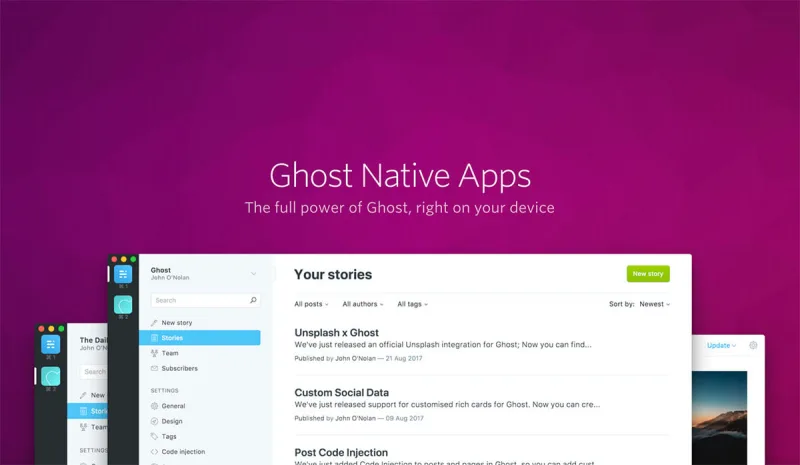
Have you checked out Ghost Desktop [https://ghost.org/downloads/] yet? It's our little app for Windows, macOS, and Linux, allowing users to work on their publications without being confined by the limits of a browser. We already implemented a host of native features, and we have even bigger plans for the future. However, the app is still written in JavaScript, using mostly the same guidelines and technologies used by both the Ghost backend and frontend. In this post, I'd like to give you a quic
Announcing Ghost for Journalism

This year we're very excited to be dedicating our entire 10 person full-time Ghost team to helping grow three independent publications, along with $45,000 in resources toward their efforts. We're calling it Ghost for Journalism [https://ghost.org/journalism/]. But I'm getting ahead of myself, let me explain: Next month, we're going to release Ghost 1.0 – which represents a significant milestone as we acknowledge that we've now built everything that the first version of the platform was suppose
2017 is gonna be awesome!
There's been an unmistakable sense of tumbleweed in the air round here over the past month or so. Fear not, it is a sign of great things to come 👻
Perhaps the biggest representation of that is our new Ghost for Journalism program, which we launched today!
Activity on the public repos is always just a fraction of what's going on @ Ghost HQ. Instead of being split across public & internal work, for the end of 2016, we got the whole team focused on replacing all of the now 3-years-old and out-of-date technology that drove Ghost.org. The astute amongst you will have noticed even this blog has a shiny new pair of shoes 👠 . The work we've done is far more than skin deep, leaving us with less maintenance work and more time for Ghost itself.
This week, it was business as usual 🎉
In the last week we have created 19 & merged 19 pull requests, plus merged 14 dependency updates, as well as opened 8 and closed 18 issues across 17 different repositories. We've also published an LTS release, Ghost 0.11.4. Any thoughts or questions? Let us know in the comments 📢
What's occurring?
The main focus of last week was on cleaning up a few bugs and features ready to ship Ghost 0.11.4 LTS. You can read all about it in the release post. LTS releases are currently scheduled for roughly once a month, so we'll look to do the next one around the first week of February.
Next week, we'll be getting back to work on the Ghost 1.0 alpha. There may be some reshuffling of what features are and aren't going to make it and then buckling in on a big push to get it ready for prime time. More news next week 🎶
Ghost Desktop 1.2.0
Since the New Year, Ghost Desktop has also had an update, with several new features including deep links ✨. Ghost Desktop auto-updates, so most people should already have the new version. If you haven't tried it yet, grab a download for your platform from https://ghost.org/downloads/.
Releases
Follow us!
Want to find out more about Ghost development? Subscribe to the updates feed or to the alpha feed if you're more interested in how v1.0 is progressing. Alternatively, follow us on twitter 🐦 or sign up to get our weekly newsletter in your inbox 📬.
Ghost 0.11.4
Ghost 0.11.4 is now available on GitHub, npm and Ghost.org. The main contents are the removal of Node v0.12 support and the new redirects feature.
Highlights
- [New] ✨ Define redirects as JSON file
- [New] ✨ Make AMP optional
- [Removed] ⬇️ Node v0.12.x support - Node v0.12 is no longer maintained
- [Fixed] Import subscribers on database import
- [Fixed] Fix admin redirect, when using a subdirectory
- [Security] Expand subscriber email validation
- [Security] Escape sameAs for structured data
- [Security] Detect symlinks when uploading themes via the admin panel
- many dependency updates
You can see the full change log for the details of all changes included in this release.
In Detail
Ghost no longer supports Node.js v0.12. It's is no longer maintained as of 31st December 2016. We will continue to recommend using Node v4 with Ghost for the time being - even that this version is not the version recommended for most users by Node.js, it's v6.
Our Node version support follows the Node.js LTS strategy. Full details can always be found at: http://support.ghost.org/supported-node-versions/.
Furthermore, this release contains two new features.
Redirects
You can now add a redirects JSON file to your content folder to define your own HTTP redirects for your blog. We have written a redirects support guide for it.
AMP is now optional
You can enable or disable AMP in the admin panel under Settings - General - AMP support. If you disable amp, all amp requests will render a 404 page.
How to Upgrade
All Ghost(Pro) users are being automatically updated and will be running Ghost 0.11.4 shortly. You're welcome :)
For people running Ghost on their own servers, you can download Ghost 0.11.4 and then check out the upgrade documentation over on our support site.
Enjoy!
Credits
Kevin Ansfield, Aileen Nowak, John O'Nolan, Austin Burdine, 唐佳诚 , Vivek Kannan, Kenneth Ashley, John O'Mahoney, Hannah Wolfe and Katharina Irrgang
Introducing nconf for configuration
It seems these blog posts have become a Friday thing 😁 . Although it wasn't the original plan, Friday posts make for a more standard week. We're going to try to get into more of a rhythm and aim for lunch time 🍴. Any thoughts or questions? Let us know in the comments 📢
What's occurring?
Whilst our public repositories have a bit of a 👻 🏘 (ghost town) feel this week, rest assured it's because our entire team is crazy busy working away behind the scenes on some internal, supporting projects. Ghost v1.0 is already packing some punch, so I thought this week I'd take this opportunity to cover one of the new developer features: our much improved config system.
Next week, the team is heading to Thailand for our biannual company retreat ✈️. Stay tuned for details of what we get up to!
Configuration with nconf
Ghost v1.0 has been in development for a couple of months now. In that time we've made some hefty changes, one of the most undocumented of which, is the change to our configuration system.
Originally, Ghost's config file was a config.js file located in the root directory, which contained configuration for the various environments. It was hard to override, and there wasn't much support for alternative configuration mechanisms such as command line flags or environment variables.
Enter nconf - this handly node library provides a simple way to support configuration via files, flags and env vars. In Ghost v1.0 you'll find a whole set of small *.json files in core/server/config and core/server/config/env that make up the base configuration. To add customisations, create a config.<env>.json file in the root of your Ghost install. Any of the settings can be overridden, except those in overrides.json.
So for example, let's imagine you've just cloned the Ghost repo to do some light hacking, but you want to have a subdirectory and use local password authentication instead of our new Ghost Auth service*:
First, you'd create a new config.development.json file in your project root.
Then, open the file and add the following JSON:
{
    "url": "http://localhost:2368/blog",
    "auth": {
       "type": "password"
    }
}
The config options available for the url, database, etc are all much the same as they were previously, only in JSON format rather than a plain javascript file. The new auth config lets you switch between the new Ghost Auth service, and the old style password authentication [1][2].
The important differences between the old and new config, are:
- Make sure all strings, including keys, are surrounded by double quotes, else you'll get "unexpected token" errors.
- Name your config file
config.<env>.json, where<env>is one ofdevelopmentorproductionand the extension is.json, not.js. - There's only one set of config per file. If you need both a development and production config, provide them in two separate files.
- Bonus: you can supply config via command line flags and environment variables, however until we have finished auditing the options and written up new documentation, you will need to use the nconf docs to figure out how to do this 🤔
Got suggestions?
So far, we've switched the underlying technology that drives our config. We still have an open issue for v1.0 to revisit the config options that we provide. So, if you have ideas for configuration options you've always wished Ghost had, or a way to improve existing options, let us know on the issue or in the comments 💬
Try it for yourself...
If you haven't seen already, you can now install Ghost using our CLI tool. Two quick commands: npm install -g ghost-cli to install the cli, change to an empty directory and run ghost install local. It takes seconds, and it sets up the initial config for you.
When it comes to tweaking the config, there are two ways to do it. The first is to run ghost config, which will prompt you for your url, and mysql credentials (this command is still a work in progress). The second is to manually edit the config.development.json file that will have been created by the install process.
Releases
Follow us!
Want to find out more about Ghost development? Subscribe to the updates feed for to the alpha feed if you're more interested in how v1.0 is progressing. Alternatively, follow us on twitter 🐦 or sign up to get our weekly newsletter in your inbox 📬.
As we're still actively developing Ghost Auth, it is currently the default option in development mode, however this will change to password based auth before v1.0 ships as it makes more sense for development blogs 🚢. ↩︎
Update 26th July 2016: Ghost Auth was pulled from 1.0.0, and so for now password auth is again the only supported option. ↩︎
Alpha 9, ObjectIDs & CLI installs
This week we merged some big changes into Ghost, which meant it took a little extra time to get the alpha ready. There will not be an alpha next week, but there will be a blog post. Any thoughts or questions? Let us know in the comments 📢
What's occurring?
As of this week, we're briefly switching the team's focus from the Ghost v1.0 alpha, to the internal tools that will support it. For the next 3-5 weeks, you'll notice less activity on the public repositories - the calm before the storm ☀️. We'll use this period to explain some of the changes we've made so far and how we're making Ghost better.
Heads up (again): there will be an v0.11 LTS release very soon! Therefore, if you'd like to get a bug fix into Ghost please submit it to the lts branch ASAP ⏳
This week
Ghost CLI nearing feature completion
In the last week or so there have been some major updates to our new CLI tool Ghost-CLI. These updates surround the recommended stack for production installs, with support for MySQL by default, systemd as the process manager and more handy messaging to guide the install process.
Ghost-CLI will be the recommended way to install Ghost once we reach v1.0. The CLI will have two major install-modes: ghost install local for quickly setting up a development or test install on your local machine and ghost install for installing and setting up Ghost on a production machine ready for prime time.
The recommended system stack for production installs will have the best chance of running Ghost successfully, and will be the stack which receives the most support from Ghost itself. It looks like this:
- Ubuntu 16.04 LTS (xenial) as the operating system
- Systemd (to manage the Ghost process)
- MySQL as the database engine
- Nginx as the webserver
- SSL (will be built into a future update)
The aim of ghost install is to get your entire system setup ready to run Ghost in production. With process management, a database, logging, SSL and so on. Using flags and plugin process managers, it will be possible to use Ghost CLI to install Ghost in a different way, but the recommended setup will always be a single simple command away.
ObjectId instead of auto increment
Until now, Ghost has used a combination of an auto increment id field and a uuid field using RFC4122 v4 UUID to identify all resources in our database. This week we replaced this with a single id field containing a globally unique identifier generated using ObjectId. ObjectID comes from MongoDB and provides a globally unique identifier which is also sequential.
This means that each resource in Ghost will now have a single 24-character string identifier that is not only unique across a single Ghost install, but across all Ghost installs. This provides many benefits, including making it easier to replicate databases, providing us some interesting options for handling import/exports and much more. You can read more about the technical reasons for this change here.
Further Ghost Editor improvements
This week has been on of consolidation for the editor project. We started on a code refactoring / cleanup process, began the process to make it more “ghost like”, completed the functionality of the “/" menu, and released a few small bug fixes around markdown and card handling. Nothing revolutionary but all part of our steady march onto 1.0! 🎖
Breaking change for storage adapters
We have added a new required method to the storage layer. It's a read method. The read method returns the bytes of a requested image path. If you would like to test alpha 9 and you are using a custom storage adapter, please note that you have to contact the publisher of your storage adapter to request an update.
Releases
- Ghost 1.0.0-alpha.9
- Ghost-Admin 1.0.0-alpha.9
- Ghost-CLI 1.0.0-alpha.8
- Ghost-Editor 0.1.5
Follow us!
Want to find out more about Ghost development? Subscribe to the updates feed for to the alpha feed if you're more interested in how v1.0 is progressing. Alternatively, follow us on twitter 🐦 or sign up to get our weekly newsletter in your inbox 📬.
Ghost Alpha 8 with MySQL as the default
Welcome to this weeks update! Apologies for the tardiness this week, good news is we now have a tool for collecting information from across our repositories, so we should be on time (Wednesday) next week. This is very much a work in progress idea, so please let us know what you think in the comments 📢
What's occurring?
We're still working away on our Ghost v1.0 alpha and the related projects. It's been a slightly quieter week as much of our effort has been on getting the new Ghost Auth service polished up.
Heads up: there will be an v0.11 LTS release within the next 2 weeks! Therefore, if you'd like to get a bug fix into Ghost please submit it to the lts branch ASAP ⏳
This week
We made MySQL a default dependency, and made SQLite3 optional
Here at Ghost HQ we ♥️ SQLite3. For most one-user blogs, it's really all you need. However, although it removes the need for database credentials, the binary dependency has always made Ghost's install process a little troublesome. With Ghost v1.0 we intend to make the install process much, much easier.
As of Ghost v1.0, we'll be making MySQL the (overridable) default for production installs AND introducing Ghost-CLI as the One True Way™ to install Ghost.
The CLI tool will offer ghost install as a wrapper around npm install, doing its best to make the install process go smoothly, and providing smart error messages if things go really wrong. To aid in all this we've moved sqlite3 to be an optional dependency and made mysql a normal, required dependency. This means that npm install will not fail if installing SQLite3 fails.
With the CLI you'll be able to run ghost install local to get a quick, SQLite3-based install for playing around on your local machine (handy for developing themes). The intention is that Ghost-CLI will first of all help to ensure that your environment is correct for installing Ghost with SQLite3 and in the worst case handle SQLite3 install failures by prompting with a fallback to MySQL.
We'll be writing more about the CLI tool over the coming weeks.
We replaced our brute force protection logic
Ghost's spam prevention middleware has needed an upgrade for a little while. This week we removed our custom code in favour of express-brute. This gives us more options for controlling how accounts are locked so it is now based on the much more desirable IP + email address combination, instead of the old email-address only.
This also moves account locking logic and state out of the user model. Recently, we also moved the concept of a user invite to be their own model instead of a state in the user model. With these two big changes, the concept of user state has been significantly simplified 🎉
Upgrades to the new GhostAuth service
We're working away behind the scenes to get the GhostAuth service ready to go. Ghost & passport-ghost both got several updates this week to handle changes in that service. If you're testing out the alpha, we're continuing to reset the GhostAuth service database regularly and therefore you will need to create a fresh database. This can be done by running knex migrator reset && knex migratior init.
Improvements to the new Ghost editor
We're still iterating hard on the new mobiledoc editor. This week's update included the removal of markdown within Ghost #379.
Releases
- Ghost 1.0.0-alpha.8
- Knex-migrator 0.2.0
- passport-ghost 1.3.0
- Ignition 2.0.0
Follow us!
Want to find out more about Ghost development? Subscribe to the updates feed for to the alpha feed if you're more interested in how v1.0 is progressing. Alternatively, follow us on twitter 🐦 or sign up to get our weekly newsletter in your inbox 📬.
Ghost Desktop 1.0 & Alpha 7
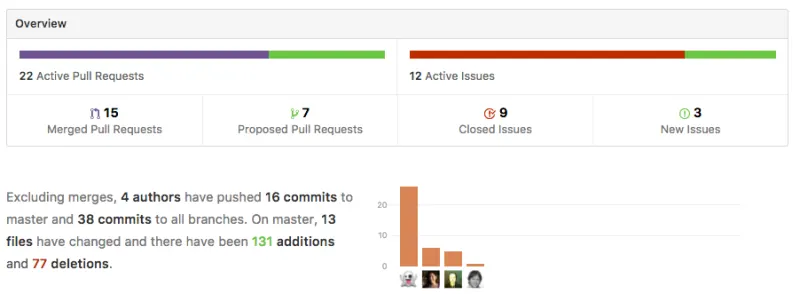
Welcome! This week for the first time, we are updating our community with a more detailed blog post instead of a meeting. This is very much a work in progress idea, so please let us know what you think in the comments 📢 What's occurring? If you haven't already heard, the Ghost Team are currently focusing our development efforts on an alpha development stream, which will eventually turn into Ghost v1.0. If you're interested to know more, we've got a v1.0 alpha support guide [http://support.ghos
Ghost 0.11.3
Ghost 0.11.3 is now available on GitHub, npm and Ghost.org. The main contents are the addition of Node v6 LTS support, and the removal of Node v0.10 support. There is also a fix for scheduling & some fixes for Casper.
Highlights
- [New] Node v6 LTS support - Ghost now officially works with Node ^6.9.0 ⬆️
- [Removed] Node v0.10.x support - Node v0.10 is no longer maintained ⬇️
- [Fixed] Issue where not all posts would be rescheduled after a restart ⏱
- [Fixed] Several minor issues with the Casper theme 🎨
- And a few dependency updates
You can see the full change log for the details of all changes included in this release.
In Detail
As of Ghost 0.11.3, Ghost supports the Node.js v6 LTS stream and no longer supports Node.js v0.10. Node.js v6 became LTS on the 18th October, and Node.js v0.10 is no longer maintained as of 31st October. We will continue to recommend using Node v4 for the time being - note this is also the version recommended for most users by Node.js.
Our Node version support follows the Node.js LTS strategy. Full details can always be found at: http://support.ghost.org/supported-node-versions/.
How to Upgrade
All Ghost(Pro) users are being automatically updated and will be running Ghost 0.11.3 shortly. You're welcome :)
For people running Ghost on their own servers, you can download Ghost 0.11.3 and then check out the upgrade documentation over on our support site.
Enjoy!
Credits
This release was lovingly crafted by Hannah Wolfe and Katharina Irrgang 🙆🏻 🙋🏻